Basics of Database internals to know about.
Intro for the series
This is just some random notes and ideas about the book I read Database internals by Petrov alex(And I love reading about the internals and architechture behind systems - Gives me dopamine tho). Don't consider it as the perfect replica/ Exact notes of the book. It may have some of my ideas and findings about the topics and changes from the original content.
Friendly Note: It may not be for beginners.
Storage engines
What exactly is a storage engine?
Apart from conventional explaination.. The storage engine is nothing but a way or method to store/acess/change data the way we want. It is like a data manipulation API with having granularity over data.
I know it might not sound technical, but you know, you get the idea right?
For example: The Database engine from Mysql(B-Tree based) and a Key value store like RocksDB(LSM based) will be different, and their use cases also vary..
Types of Databases
-
OLTP Databases.
OLTP(Online Transaction Processing) databases are the holy grail of the buisness systems, Every single banks will use the OLTP based system inorder to survive the machine or OS crashes to maintain their transaction based systems.
Every change will be made via a transaction(TX) - No partial writes. System stays atomic all the time.
Cause it follows the ACID properties. most of the databases will be in the category of row based, Example: Myql and Postgresql
-
OLAP Databases
OLAP(Online analytical processing) databases are meant to be for Analytical based workloads, where the data is always/retrieved or manipulated in larger scale, and it does'nt need to be transaction based. Example: Clickhouse
-
HTAP Databases
It is a mix of both OLTP and OLAP. It should support both analytical as well as transactional.( I did'nt seen anything till today with perfect of both OLTP and OLAP, but we can combine the OLTP + ETL + OLAP to achieve this).
DBMS Architechture
Each database provides it's own value and it's own use. Most(Almost all) of the database systems will follow the client/server architechture where it will talk to the other systems or clients and transfer thier data over the protocols they follow.
But most of them will follow the same architechture but different implementation.
Core Components
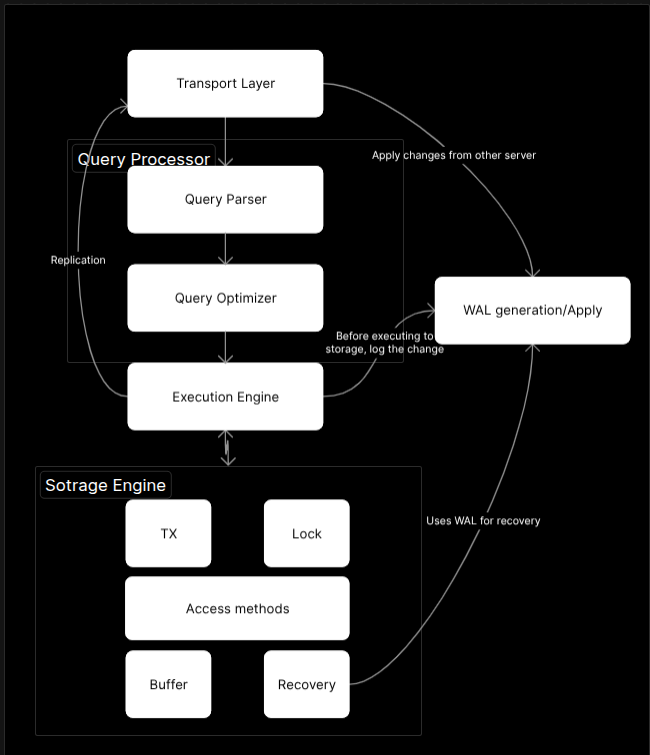
Here, we have a DBMS architechture which says the core parts to be present inorder to store a data. It might vary database to database. Since I am biased with Disk persisted DBMS, I am goint to use this image.
Transport Layer
This part is the curcial part where it will handle the outer communication with the clients(Applications for some instance) and authenticates(SSL auth if configured) the clients and transports the data with specifed protocol. Example Postgresql uses Wire protocol.
It will also communicate with the the other servers to store it's log change, to apply the changes made by the server(Replication).
Note: The log that I have mentioned will have a significant role to restore the database from crash. Will cover it sooner.
Query Processor
Each databases will have it's own query processor to process the clients query and make sure it is semantically correct. And the syntactial corectness of the query. And parse the query to pass it to the optimizer.
And finally the Optimizer, It is one of the core components to be used to optimize the query the client have given. It uses fancy algorithms and medians to find the correct points and a query plan... And many magics to find the best and most optimized way to execute the query.
Let's dive into Optimizer in another blog.
Execution Engine
Execution engine is the query executioner, since Query optimizer will plan the best available plan. The query plan will be executed by the execution engine and collect the results and send it to the transport layer.
But before execution, it will make sure to have an entry in the log, for future recoveries.
Storage engine
It has the more cool parts that you could imagine, It maintains a way to store/retrieve/access the data(We already talked about that) over the disk and the memory.
It has
- TX manager
- Which will be the key for concurrent transactions to access/change the data without modifying the other transactions [Check transaction isolations].
- Lock manager
- The lock manager is responsible for the resource managing sections, what if 2 transactions/2 process trying to acess a same file or table. It might lead to corruption. to avoid that we use locking mechanisms to have that sorted out.
- Access methods
- Different DBs has different access methods to the data, OLTP databases will basically have a variant of B-Trees, where as the Key-value store will have a variant of LSM Trees or a different one. EOD we are trying to fetch a data that is closer to our use case with different DBs.
- Buffer
- Instead of using the Disk always to manipulate the data and flush it to disk every time, we use buffers to store some of the changes of data(pages) in the memory to reduce the disk I/O time(because every time you touch a disk it will take time ), by flushing it periodically or in specific instances(memory buffer full).
- Recovery
- Recovery is one of the most important thing an OLTP might provide(Not sure about OLAP). At a specific point of time or middle of a transaction or middle writing the data is written to disk a issue might occur in the machine and crashes the database.
- The crazier part is to make sure that every single change that is written to the database(even though it is in memory) should be recoverd. This part is handled by the log we used to put when an execution happens.
- Database will read the log, and make the delta or "not finished" changes to the disk when it's comes to online.
Memory vs Disk databases
Memory Databases
TBH Memory databases are meant to be fast due to the in memeory data structures, there are various ways you could have your data and the access time over the data in memory is so fast. But Memory is costly and less durable comaritive to Disk databases.
When a database crash or the machine restarts all the data will be gone in memory databases... Poofff...
Example: Redis
Disk Databases
But when it comes to disk databases they are comparitively slow to memory databases... but non-volatile(i.e the data will be stored in files )so we can get the data back even after a crash or machine restart.
Disk is so cheap when it compared to memory, and disk access time will be larger.
It is so difficult to maintain or manipulate over the disk, because In memory databases the free space / memory will be easily managed by the OS itself(Think of garbage collection, or freeing a pointer) . But in Disk databases need to maintain the free space and maintain the sanity and utilize most of the disk by the database itself.
And it is very costly and time consuming to look into disk(IO).
Example: Mysql and Postgres
Row-Based layout
Row based structures are like records that are stored each other to form a table. Each record will hold the data for the entitiy.
| ID(BIGINT) | NAME(VARCHAR) | AGE(INT) |
|---|---|---|
| 1 | Harish | 22 |
| 2 | Sandy | 23 |
| 3 | Abi | 28 |
It will store the whole record as it is in the disk, meaning all the user name with 'Harish' or anyone will be stored with entity itself in disk. The fetch of a record or column it will fetch the whole row from the disk. That is why, If I want to take only the age of a user will be costlier, since the whole record will be read to take only the age column.
Column-oriented layout
Column based structures are storing the data column wise(pretty simple right?), Comparing the earlier row based table. Each of the column will be stored indudivaly...
ID={1, 2, 3}
NAME={'Harish', 'Sandy', 'Abi'}
AGE={22,23,28}
Since each and every column has it's own data type, we can easily compress the data and store it. So it will have lesser disk space compared to the Disk based layout. It will be most used for analytical purpose, since the whole column is stored, we can easily use SUM(AGE) or AVG(AGE) directly, it will fetch only the respective column, Instead of fetching the whole row.
Wide column layout.
This is a pretty trick one. This databases are only used for Data warehousing(storing past data) and Data set collection. It will have tables that has as many columns as possible, The tables will have column family, where columns are clubbed together to have a row key(It might sound complex tho)
You can read more about this in this website. Explained very well in detail.
To take it to simple anology, I can show how the data will be present in context of programing Java and Go
#Java
Map<Row,Map<Column,Value>>

#Go
map[Row]map[Column]Value
Crazy Fact: Google Earth , Google maps, crawler for search engine and Google analytics use this type database to store maps and analytics data
If you want to have indepth conceptual understanding, the BigTable paper will be the correct place. (IG I should read it fully)
Data Files
Data files are the files that holds the data of the database. Which can be of three types and categorized to two -> clustered index and non clustered index.
- index-organized files
- heap-organized files
- hash-organized files
Index organized files
Index organnized files stores the data records itself, when they search the data, Instead of store their location where to get the data they actually store the data.
Data in Index
[12, (record={1,"Harish",23})]
Which is quite good for some extent. because If we store the data in the index itself of we don't need to have disk I/O twice(one for searching in index file and another for data file)
The pros extended to have easier range scans(clustered Index-> data sorted), just scoop the records because every record will be aranged in leaf nodes and easier to maintain.
But Inserts will be slower since we need to rebalance the whole structure in disk. Which is not optimal for Heavy writes.
Example: MySQL(InnoDB engine)
Heap-Organized files
Heap organized files are like storing the data as it is with respect to the write order in the heap files(Non clustered Index-> data without sorted). Yeah they are very useful for write friendly.
They won't look back the writes, they just append it.
How to read the files ? A seperate index file will be maintained where the actuall data lives.
Offsets in Index
[14, (record in {Page=23,Offset=0x232E})]
Better for writes, since the write will be appened and later the data may be changed
Example: PostgreSQL
Hash Organized files
Hash organized files simply stores / fetches by the record hash . When a record is inserted the hash function will hash the record and store it in any of the buckets. Simplified example will be
#Hash function to determine the bucket
hash(record{Table:Genie, Id:2}) = 4 -> Bucket 4
Then the bucket mapping will also be stored in the disk. And finally the record is stored in the disk. This is also cool when it is write only and better for distribution around the network, single point lookup will be faster.
But not used for multi scans, because we need to calculate for each and every id.
Summary
This is the internals of database systems store or actually work, each has its own pros and cons. We need to decide which one is suitable for our systems.
Will see you in next chapters :-)